Hands-On SQL Joins
Practical Oracle Examples
A friendly, step-by-step walkthrough of creating tables and constraints in Oracle. Includes live examples, expected outputs, and diagrams — perfect practice for the 1Z0-071 exam.
1 Learning objectives
- Learn how to write Oracle Join queries
- Understand the difference between Left, Right and Full Outer Joins
- Learn how to use NATURAL JOIN and USING
- Things to remember about Joins
2 Our initial datasets
Let’s start with 3 datasets that we will use to practice Oracle SQL
Table : ALFA_DEP
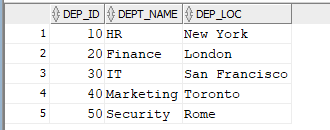
Table : ALFA_EMP
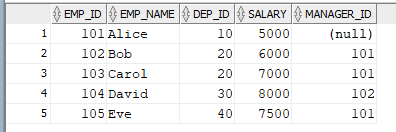
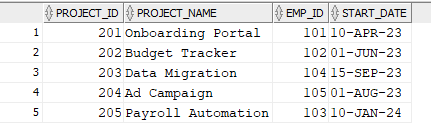
Table : ALFA_PRJ
ALFA_DEP and ALFA_EMP share a common column (DEP_ID)
ALFA_EMP and ALFA_PRJ share a common column (EMP_ID)
3 — INNER JOIN
In this example we will join ALFA_DEP and ALFA_EMP using the common column and using the JOIN syntax
select d.dep_id,d.dept_name, d.dep_loc,
e.emp_id, e.emp_name
from alfa_dep d
join alfa_emp e on d.dep_id = e.dep_id;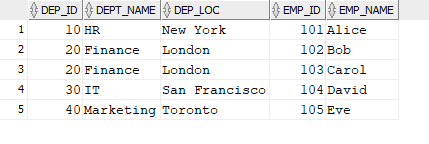
As you can see we are getting all matching records because we are using an inner join
4 — LEFT JOIN
What if we want to see all the departments existing even if there is not any employee assigned to it. In this case we need to run a left join
select d.dep_id,d.dept_name, d.dep_loc, e.emp_id, e.emp_name
from alfa_dep d
left join alfa_emp e on d.dep_id = e.dep_id;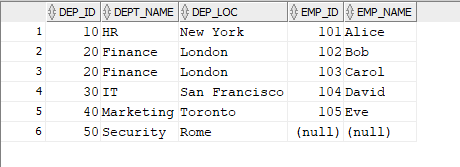
Now we can see the department 50 which we could not see in the previous section
5 — MULTIPLE JOINS
In this section we will see how to join more than 2 tables. Let’s join ALFA_DEP with ALFA_EMP by dep_id and then join the resulting subset with ALFA_PRJ by emp_id
-- multiple left inner join
select d.dep_id,d.dept_name, d.dep_loc, -- first table
e.emp_id, e.emp_name, -- second table
p.project_name, p.start_date -- third table
from alfa_dep d
left join alfa_emp e on d.dep_id = e.dep_id -- first join
left join alfa_prj p on e.emp_id = p.emp_id -- second join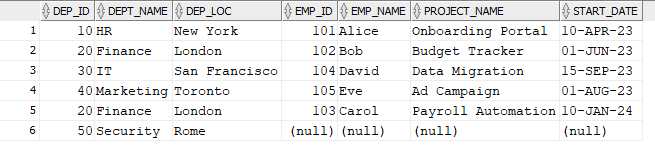
If we want to restrict we can apply some filtering like below
select d.dep_id,d.dept_name, d.dep_loc, -- first table
e.emp_id, e.emp_name, -- second table
p.project_name, p.start_date -- third table
from alfa_dep d
left join alfa_emp e on d.dep_id = e.dep_id -- first join
left join alfa_prj p on e.emp_id = p.emp_id -- second join
where p.start_date > to_date('15-SEP-2023', 'dd-mon-rrrr');
6 — NATURAL JOIN
If the tables that we are joining have a common column with the same name we can use NATURAL JOIN to join the 2 tables
SELECT * FROM ALFA_DEP
NATURAL LEFT JOIN ALFA_EMP; -- This be default is an inner join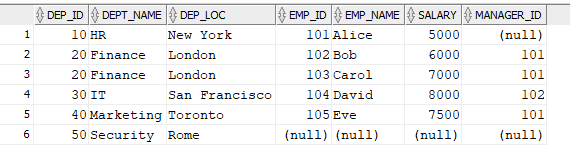
NATURAL JOIN can be used for LEFT OUTER JOIN / RIGHT OUTER JOIN / FULL OUTER JOIN
In this example we perform a LEFT NATURAL JOIN
SELECT * FROM ALFA_DEP
NATURAL LEFT JOIN ALFA_EMP;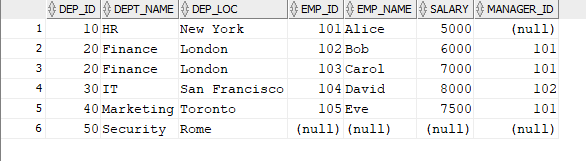
After the natural join you can filter the rows like in a normal query
SELECT * FROM ALFA_DEP
NATURAL LEFT JOIN ALFA_EMP
WHERE MANAGER_ID is not NULL
AND SALARY > = 7500;
7 — USING join
Another way of joining tables is by the keyword USING
SELECT * FROM ALFA_DEP
LEFT JOIN ALFA_EMP
USING (DEP_ID)
WHERE MANAGER_ID is not NULL
AND SALARY > = 7500;
8 — NATURAL JOIN vs USING : what to remeber
A) Both of them perform only equi join (=). They cannot peform non equi join (where value > ,Between )
B) Essentially NATURAL JOIN and USING perform the same operation
C) They can join using multiple criteria, they can both perform left, right, and full outer joins
D) They both need the same name in the common column to work
E) The difference is the fact that using is explicit : it tells exactly the column(s) used to join. Natural Join is doing so implicitly by looking at the column(s) with the same name. Using overall is safer being more explicit and transparent on the criteria used for the join